Set the black point, white point, and midtones.
Set black and white points, adjust midtones, and control the output tonal range.
Try it in your agent.
Use this prompt as a starting point. Review the result, then ask for the details you want to change.
A prompt to start from
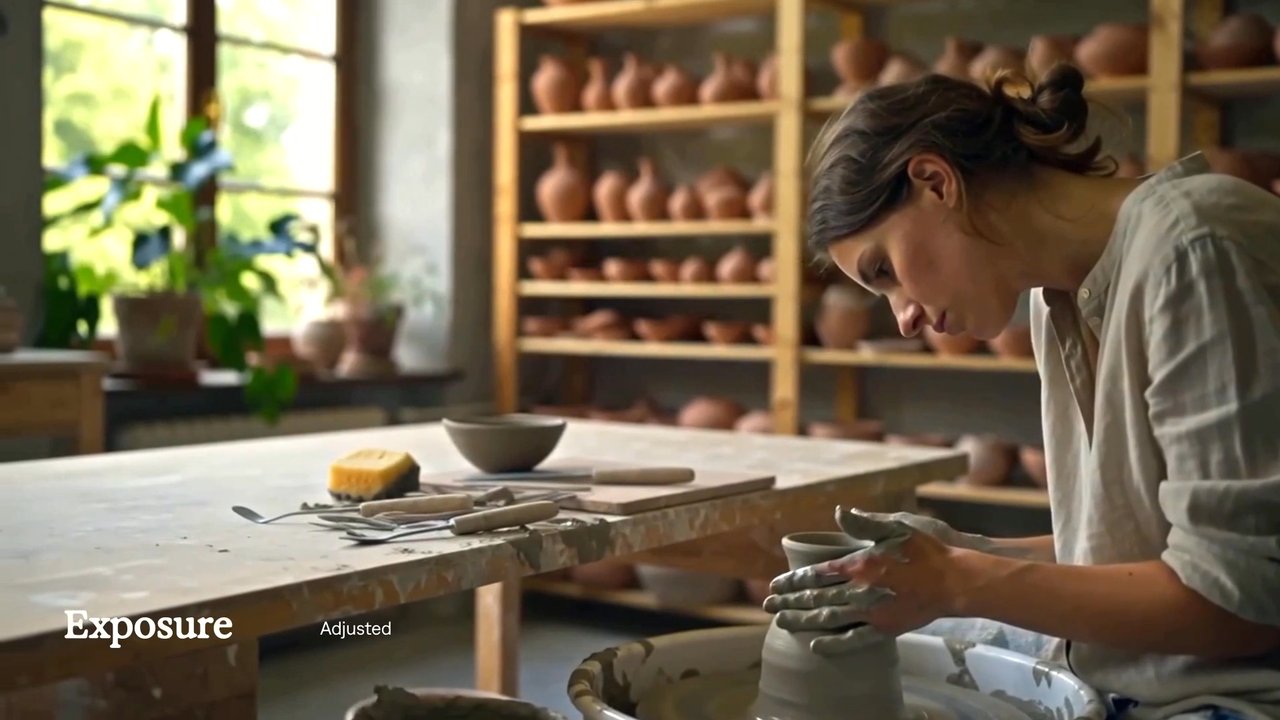
Use Tesseract. Create an eight-second Tesseract Levels example with a tall crop of the workshop footage occupying the left 1216 px and a quiet Bone editorial panel on the right. Set three large Exposure lines “Light.” “Shade.” “Balance.” and small Denim branding. Leave the opening untreated, then ease Levels input black to 10, input white to 240 and gamma to 1.18 between 1.2 and 3.6 seconds. Keep output endpoints at 0 and 255. Preserve moving footage, neutral type, ample spacing and editable controls.
New to Tesseract? Find the setup for your agent.
A few useful details.
How do I try this with my agent?
Install or update Tesseract in a supported agent, attach your source files, and copy the prompt. Review the preview, then ask for the changes you want. The composition stays editable as you refine it.
Where does the video render?
Tesseract renders in the environment where your agent runs it, including supported local computers and hosted Linux environments. The engine is free; your agent’s subscription or usage costs are separate.
Put it to work in a video.
See how this tool fits into a complete, editable project.
Try these next.
Your next video, made with your agent.
Install Tesseract in your agent, bring a brief, and start creating.
Free on Mac, Windows, and Linux. Your agent’s costs are separate.
Read the prompt
Set up Tesseract by Mirage so you can create editable designs, edit videos, and make motion graphics in this agent’s environment. Read https://github.com/mirage-hq/Tesseract and check the requirements for this local or hosted environment. If it is supported, follow the official plugin or skills installation guide, use its required runtime version, verify the download checksum, and confirm a short preview renders correctly. Then ask what I want to make and which brand references or source assets I have. Keep the editable project and source assets with the finished render.